
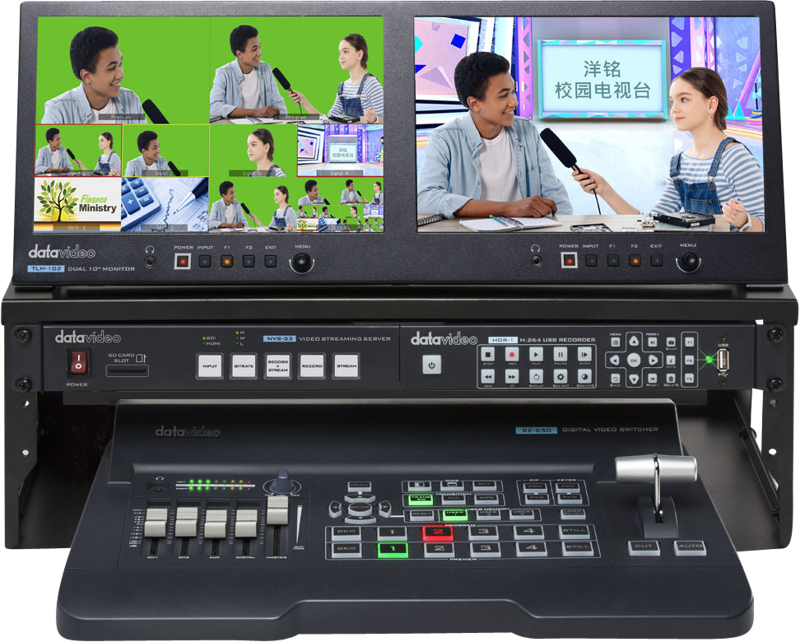
Datavideo GO-650-Studio 4 Inp HDMI/SDI switcher w. streaming/rec
- VAT free purchase available at checkout.
- BrandDatavideo
Description
Article no.: 24792
Datavideo GO-650-Studio – 4-Channel HD HDMI/SDI Switcher with Built-in Streaming and Recording
The Datavideo GO-650-Studio is a 4-channel HD portable video production studio that combines multiple live production tools in a compact unit. It supports 4-input HDMI/SDI switching and brings streaming, recording, audio mixing and monitoring together in one small-sized system.
5-in-1 Compact Production Solution
This unit delivers a complete, small-sized production workflow. In a single device you get:
- 4-channel HDMI/SDI switching for live multi-camera productions
- Built-in streaming capabilities via an H.264 web streaming encoder
- Recording functionality to capture your program
- Audio mixing for live balance and control
- Monitoring tools to keep an eye on program output and sources
Broadcast-Quality Video and Live Effects
The GO-650-Studio offers broadcast-style features to enhance live shows. It includes downstream keyer (DSK) and picture-in-picture (PIP) capabilities. In addition, the unit features a dual chroma keyer for stronger green/blue screen compositing, enabling professional-looking overlays and keying in live production.
Streaming and Platform Compatibility
The unit incorporates a built-in H.264 web streaming encoder. Consequently, you can stream your show to major services quickly. Supported destinations explicitly include Facebook Live, YouTube and Twitch, and the encoder can stream to virtually any CDN that accepts H.264 streams.
Built-in Animations and Virtual Backgrounds
To speed up show production and add polish, the GO-650-Studio provides pre-saved assets. You can choose from a variety of animated stinger transitions and virtual set backgrounds, which simplify scene changes and make multi-camera switching appear more professional.
Who This Is For
This compact studio suits small production teams and solo operators who need a portable, feature-rich solution. Use it for live streaming shows, multi-camera events, and situations where switching, recording and audio mixing must be handled in a single device.
How It Helps Your Workflow
By combining switching, streaming, recording, audio mixing and monitoring, the GO-650-Studio reduces the need for multiple separate devices. As a result, you can set up faster, operate with fewer components, and maintain consistent control of video and audio during a live production.
FAQ
-
Question: What types of video inputs does the GO-650-Studio support?
Answer: The unit supports 4-channel HDMI and SDI inputs for HD video switching. -
Question: Which streaming platforms can I use with this switcher?
Answer: The built-in H.264 web streaming encoder enables streaming to Facebook Live, YouTube and Twitch, and it can stream to virtually any CDN that accepts H.264 streams. -
Question: Does the GO-650-Studio offer live video effects?
Answer: Yes. It provides broadcast-style features such as DSK (downstream keyer), PIP (picture-in-picture) and a dual chroma keyer for live compositing. -
Question: Can I record my program with this device?
Answer: The GO-650-Studio supports recording in addition to streaming, allowing you to capture your output for later use. -
Question: Is the GO-650-Studio suitable for mobile or small studio setups?
Answer: Yes. It is described as a portable, small-sized production studio that combines multiple production functions into one compact system, making it suitable for compact setups and mobile use. -
Question: If I need more details about simultaneous functions, what should I do?
Answer: The product supports switching, streaming, recording, audio mixing and monitoring; for specifics about simultaneous operation and workflow examples, please contact the retailer or consult the product manual for exact operational details.