
Datavideo KMU-200 All-In-One Single camera production unit
- VAT free purchase available at checkout.
- BrandDatavideo
Description
Article no.: 24811
Datavideo KMU-200 All-In-One Single Camera Production Unit – 4K Multi-Channel Touch Screen Region of Interest Switcher
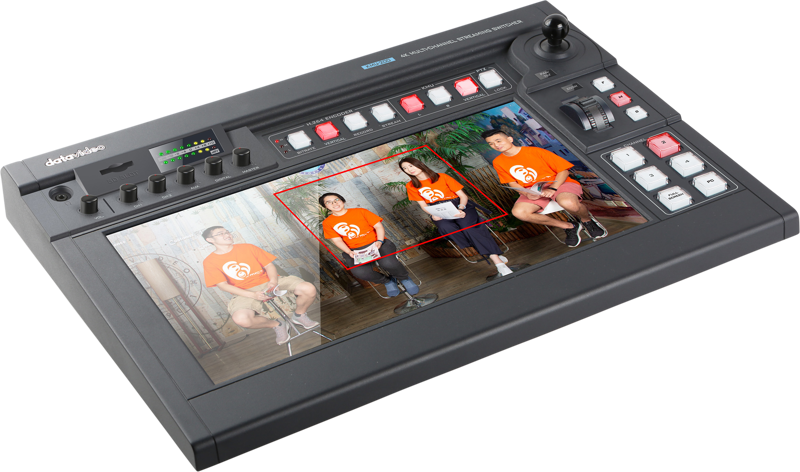
The Datavideo KMU-200 turns a single 4K camera into a full HD virtual multi-camera production system. It uses a large touch screen and familiar gestures to create up to four independent cutouts from one 4K image, so you can produce multi-angle video without multiple cameras.
Key capabilities and workflow
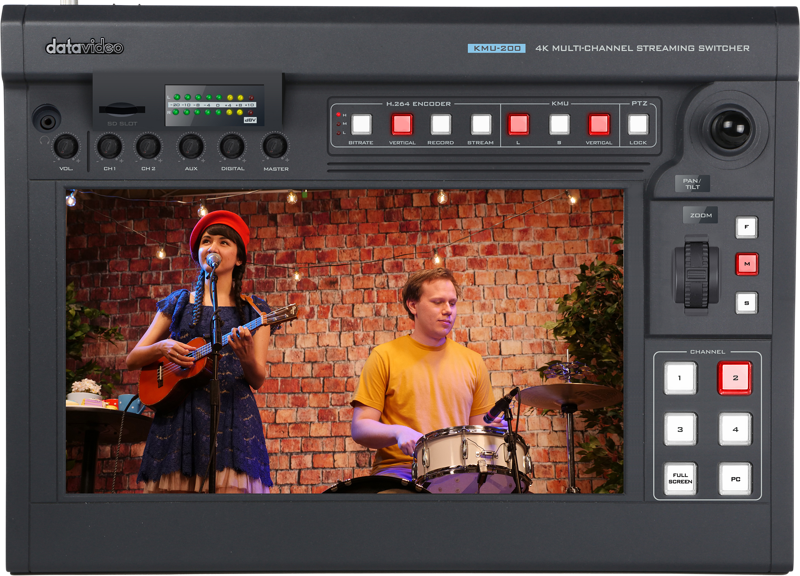
The KMU-200 combines capture, switching, encoding and recording in one unit. Use the touch screen to pinch, swipe and reposition four independent regions of interest. Then switch between those virtual cameras, a full shot and an extra HDMI input using simple controls. The unit also includes hardware controls for precise positioning when you need PTZ-like accuracy.
4K input and virtual multi-camera output
Connect any 4K camera and create up to four full HD cutouts from the single 4K image. This approach helps reduce the number of physical cameras needed for interviews, small panels or places of worship. Because the KMU-200 outputs full HD virtual cameras, you get multi-angle production while relying on one high-resolution source.
Touchscreen operation and alternative controls
Operate the KMU-200 with familiar touch gestures used on tablets and phones: pinch to zoom and swipe to move cutouts. Alternatively, use the joystick, zoom knob and hardware buttons for fine control and repeatable positioning. These options let you work quickly with intuitive gestures or precisely with physical controls.
Horizontal and vertical video production
The KMU-200 supports both horizontal (16:9) and vertical (9:16) production modes. Switch between modes with a single button or rotate the screen to match your production format. The unit provides predefined buttons to create four virtual camera angles, the full shot and an extra HDMI input, simplifying live switching for either orientation.
Dual streaming encoder and dvCloud compatibility
The unit features a dual streaming encoder, enabling simultaneous streaming to two different platforms directly from the device. Connect the KMU-200 to your local network, configure the encoder from a PC on the same network, and start streaming with the stream button. For broader distribution, the KMU-200 integrates with Datavideo’s DVCloud service to send your stream to multiple destinations without extra hardware.
DVCloud also supports direct recording to the cloud in H.264 format. Use SRT streaming to DVCloud to reduce hiccups and lag when dealing with slow or unreliable internet or long-distance streaming. Then deliver to destinations that accept RTMP by relaying from DVCloud if needed.
Recording and file handling
Record live productions directly to SD cards in H.264 format while streaming. The KMU-200 provides a turn-key solution for simultaneous live streaming and local recording, so you can quickly bring recorded files into your editing suite after the event.
Audio support and embedding
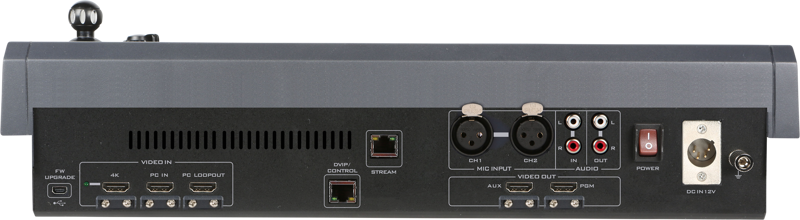
Embed audio within the video using the built-in four-channel embedded audio mixer. The unit accepts both RCA and XLR inputs and offers audio volume adjustment, giving you flexible audio routing and level control for live productions.
Additional HDMI input, loop out and reliability features
The KMU-200 includes an extra HDMI input for an additional camera angle or a computer presentation source. The HDMI loop out enables direct monitoring for production directors. All HDMI inputs include built-in strain relief bars to reduce the risk of cables becoming unplugged during a production.
Who should consider the KMU-200?
- Producers who want virtual multi-camera workflows from a single 4K camera.
- Teams needing quick switching between horizontal and vertical formats.
- Users who want integrated streaming to two platforms and optional DVCloud distribution.
- Small studios, interview setups, houses of worship and education environments where reducing camera count is a priority.
In the box
- 1 x KMU-200 Main Unit
- 1 x AD Switch DC 12V with AC Cord
FAQ
Question: Can the KMU-200 stream to more than one platform at the same time?
Answer: Yes. The KMU-200 has a dual streaming encoder that allows simultaneous streaming to two platforms. For wider distribution, you can also use Datavideo’s DVCloud to forward your stream to multiple destinations.
Question: How do I create multiple camera angles from a single 4K camera?
Answer: Use the touch screen gestures to create up to four cutouts or regions of interest from your 4K image. You can reposition these cutouts by pinching and swiping, or use the joystick, zoom knob and hardware buttons for precise PTZ-like control.
Question: What recording options are available during a live stream?
Answer: While streaming, the KMU-200 can simultaneously record locally to SD cards in H.264 format. You can also record to DVCloud in H.264 if you use the integrated cloud service.
Question: Can I switch between horizontal and vertical video formats easily?
Answer: Yes. The KMU-200 supports both 16:9 and 9:16 production modes. You can toggle vertical mode with a single button or rotate the screen to adapt the interface and outputs to vertical video production.
Question: What audio inputs does the KMU-200 support and can audio be embedded?
Answer: The unit includes a four-channel embedded audio mixer with RCA and XLR inputs. You can embed audio into the video signal and adjust audio levels directly on the device.
Question: Is there provision for monitoring and ensuring cable reliability?
Answer: Yes. The KMU-200 provides an HDMI loop out for monitoring presentation inputs, and all HDMI inputs have built-in strain relief bars to help prevent accidental unplugging during productions.