
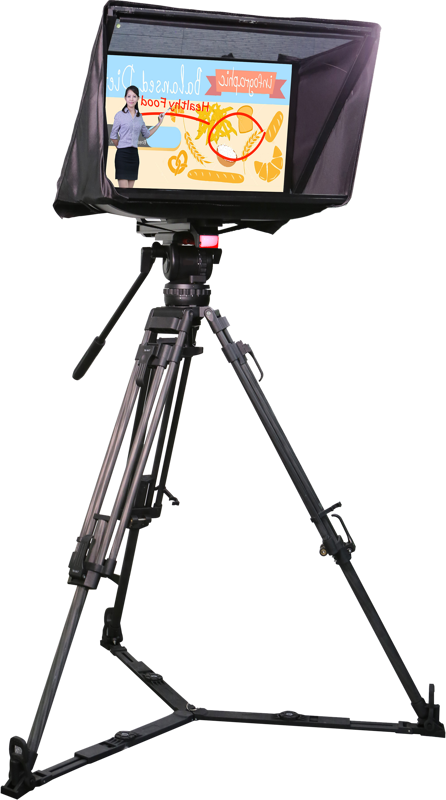
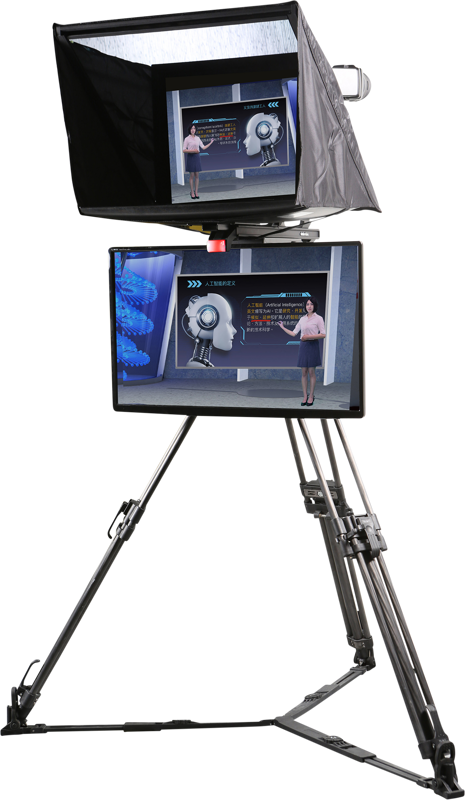
Datavideo LBK-1 LookBack kit for Webinar Presenter Sys
- VAT free purchase available at checkout.
- BrandDatavideo
Description
Article no.: 24839
Datavideo LBK-1 LookBack kit for Webinar Presenter Sys – Look back with tally indicator
The Datavideo LBK-1 LookBack kit lets presenters and talent view the camera image while getting a clear tally signal that the camera is live or recording. It mounts on a tripod and supports a 22" LCD with a VESA 100x100mm mount, making it suitable for webinar and presenter setups where on-camera feedback and a tally light are required.
Key features and use cases
The LBK-1 provides a visible monitor position and a single tally LED that signals on-air status. As a result, talent can monitor framing and presenters can see when recording or live transmission begins. The kit suits webinar presenters, lecture capture, and live-streamed events where a compact lookback monitor and tally are needed.
Compatibility and mounting
The kit fits on any tripod, enabling flexible positioning during shoots and presentations. It can house a 22" screen with a VESA mount and fits most 22" LCD screens that use a VESA (100x100mm) mounting pattern. Therefore, you can combine the LBK-1 with common 22" displays that support VESA 100x100mm.
Tally information
The LBK-1 includes one tally light. The tally light color is red, and the unit receives tally input via a 3.5mm phone jack. Use this tally signal to inform talent that the camera is live or that recording has started.
| Specification | Detail |
|---|---|
| Tally Light Color | Red |
| Tally Light Number | 1 |
| Tally Light Input Interface | 3.5mm Phone Jack |
In the box
The LBK-1 kit ships with all hardware needed to assemble and mount the lookback monitor and tally. The package contains the following items:
- 1 x Main Support Rail
- 2 x Spacer Block
- 4 x Screw (Wing Nut 1/4 20UNC 12.5mm Nickel Plated)
- 2 x Screw (Pan-Head 1/4" 20UNC 12mm Nickel Plated)
- 1 x Riser Block
- 4 x Screw (1/4" 20UNC Hex Head 31mm)
- 1 x Camera Dock Module
- 1 x 1/4 20UNC Screw
- 2 x Anti-Collision Rubber Strip
- 1 x Glass Sheet
- 1 x Glass Frame Module
- 1 x Hood Support Wire
- 1 x LCD Mounting Bracket
- 4 x Nyloc Screw (ISO Counter Sunk M4*8m/m Black (RoHS))
- 1 x Cloth Snood
Quick setup notes
First, mount the main support rail to your tripod using the appropriate screws. Then install the LCD mounting bracket and fit a compatible 22" VESA (100x100mm) display. Finally, connect the tally input through the 3.5mm phone jack to activate the red tally LED when the camera is live or recording.
FAQ
Question: Will the LBK-1 work with my tripod?
Answer: Yes. The LBK-1 fits on any tripod, so you can mount it where you need the lookback monitor and tally indicator during webinars or live events.
Question: What screen size and mounting pattern does the kit support?
Answer: The kit can house a 22" screen with a VESA mount and fits most 22" LCD screens that use a VESA 100x100mm pattern, allowing straightforward integration with common 22" displays.
Question: How does the tally light connect and what does it indicate?
Answer: The single red tally light receives its signal via a 3.5mm phone jack. It indicates on-air or recording status to the talent, helping presenters know when the camera is live or when recording has started.