
Datavideo TVS-2000A PTZ tracking 3D Virtual Studio System
- VAT free purchase available at checkout.
- BrandDatavideo
Description
Article no.: 24868
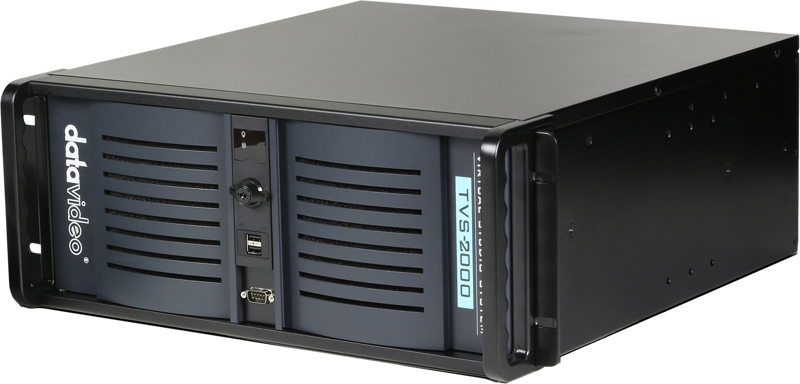
Datavideo TVS-2000A – PTZ tracking 3D Virtual Studio System for real-time camera tracking
The Datavideo TVS-2000A is a tracking virtual studio system that uses PTZ camera position tracking to deliver a convincing 3D virtual studio experience. It combines multiple production tools in one unit to help schools, local TV stations and businesses create high-end virtual productions without complex rigging.
Five-in-one production solution
The TVS-2000A integrates five functions into a single system: a tracking/trackless virtual studio, a video switcher, a character generator, a video recorder and a web streaming encoder. This compact design makes the system versatile, easy to use and cost effective for a range of live production scenarios.
Real-time two-camera PTZ tracking and trackless mode
The system supports two-camera tracking to provide real-time camera tracking for high-end virtual studio production. You get the benefits of true PTZ tracking without the need for a tracking jib or crane. This reduces setup complexity while maintaining realistic virtual camera movement.
If you do not use a Datavideo PTZ camera, the TVS-2000A can operate in trackless mode. In trackless mode it simulates camera movements, allowing you to create multi-camera-style productions even with fewer physical cameras.
Multi-camera simulation and real pan/tilt/zoom for virtual cameras
The TVS-2000A supports Tracking Virtual Studio and Trackless Virtual Studio simultaneously. All four virtual cameras provide real pan, tilt and zoom movements for lifelike perspective changes.
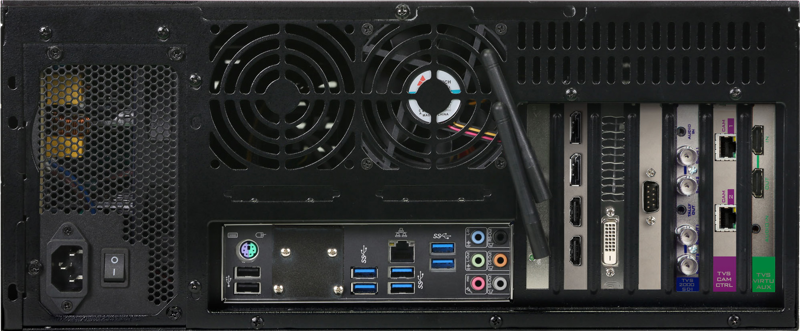
With two SDI inputs, the system can simulate a four-camera studio operation in Trackless Mode. This gives producers more creative camera angles without additional camera hardware.
Inputs and audio embedding
The unit includes one HDMI AUX input for connecting a laptop for PowerPoint or any other live HDMI video source. It also supports a mini phone jack audio input so you can embed external audio into the SDI/HDMI program (PGM) output.
Built-in Virtual Set Wizard and extensive virtual set resources
The TVS-2000A includes a free Virtual Set Wizard with a large collection of 3D objects to guide users step by step when building a customized 3D virtual studio. The wizard allows new virtual sets to be created quickly and without specialized 3D software knowledge.
The system ships with 80 free virtual sets included. Datavideo also offers unlimited free virtual set downloads from its online library, making it easy to expand or change your virtual environment as needed.
Example download resources (plain URLs):
- Free Virtual set: https://www.datavideovirtualset.com/en/tvs-center/10
- Free 3D virtual set template: https://www.datavideovirtualset.com/en/tvs-center/11
- Free 3D virtual set decoration: https://www.datavideovirtualset.com/en/tvs-center/12
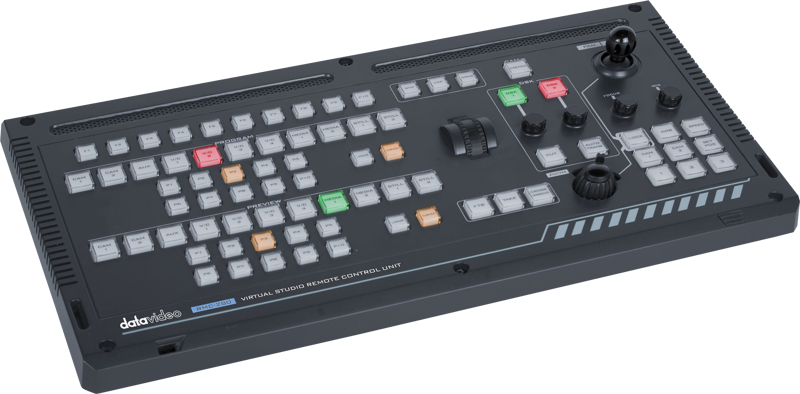
Included virtual show controller (RMC-280)
The TVS-2000A includes the RMC-280 control panel for live virtual show and camera control. The RMC-280 features 10 function keys (F1–F10) that you can program to trigger quick animations, switch scenes or change media content, streamlining live production and reducing the need for manual mouse control.
Who this system is for
The TVS-2000A is designed for organizations that want realistic virtual studio production without complex hardware setups. Because setup is similar to a regular PTZ camera production, schools, local broadcasters and corporate production teams can deploy the system fast and start producing believable virtual shows.
In the box
- 1 x TVS-2000A Main Unit
- 1 x Power AC Cord
- 1 x 2.5'' HDD Box (with SATA to USB cable)
- 1 x USB Mouse
- 2 x Labels
- 4 x screws M3
- 1 x RMC-280 Unit (Include D-Sub 9 PIN Cable + DC 12V power adaptor)
- 1 x 802.11AC Antenna / or USB dongle
Frequently asked questions
Question: Can I use the TVS-2000A without Datavideo PTZ cameras?
Answer: Yes. If you do not use a Datavideo PTZ camera, the system supports a trackless mode that simulates camera movements so you can still create multi-camera-style virtual productions.
Question: How many virtual cameras can I use, and do they have real camera movements?
Answer: The system provides four virtual cameras with real pan, tilt and zoom movements. With two SDI inputs, you can simulate a four-camera studio operation in Trackless Mode while also using tracking features where available.
Question: Does the TVS-2000A include virtual sets and tools to build my own set?
Answer: Yes. The unit includes the Virtual Set Wizard and 80 free virtual sets, plus a large online library for unlimited downloads. The wizard helps you build a customized 3D virtual set step by step without requiring 3D software skills.
Question: What control options are included for live shows?
Answer: The RMC-280 control panel is included. It has 10 programmable function keys (F1–F10) for quick animations, scene changes or media triggers, making live control fast and intuitive.
Question: Can I add external audio and laptop slides to the program output?
Answer: Yes. The system supports a mini phone jack audio input to embed external audio into the SDI/HDMI program output. It also provides an HDMI AUX input for laptop PowerPoint or other HDMI sources.
Question: Where can I get more virtual set templates and decorations?
Answer: Datavideo maintains an online library with virtual set templates and 3D decorations. The product documentation and the listed download pages provide direct access to these resources for free.