
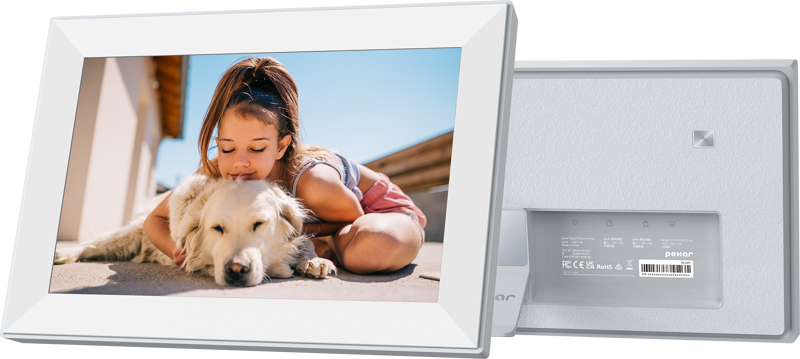
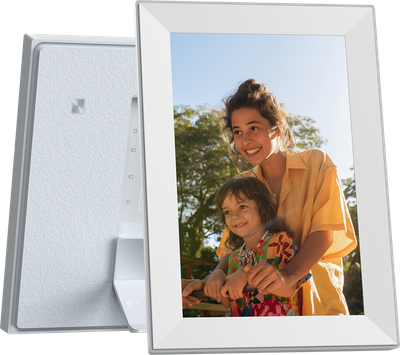
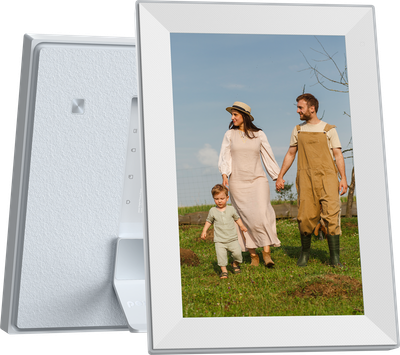
Lexar I Pexar Digital Picture Frame I 10.1-inch (Black) expandable with 32GB SD card or USB Flash
- VAT free purchase available at checkout.
- BrandLexar
Description
Article no.: 31751
Lexar pexar Digital Picture Frame – 10.1-inch HD touchscreen with 32GB built-in storage and expandable memory
Enjoy clear, vibrant photos and simple sharing with the Lexar pexar 10.1-inch digital picture frame. The HD touchscreen displays images at 1280 x 800 resolution, while an anti-glare surface reduces reflections. A thin-bezel design and magnetic stand let you position the frame in portrait or landscape. Built-in 32GB storage holds thousands of images and you can expand capacity with an SD card or USB flash drive.
Key features at a glance
- 10.1-inch, 1280 x 800 HD display
- Anti-glare screen for improved clarity
- Thin-bezel design with magnetic stand for portrait and landscape placement
- Touchscreen controls for easy navigation
- 32GB built-in storage holds up to 40,000 photos (based on 600KB per photo)
- Supports SD cards or USB drives up to 256GB to expand storage
- Share photos and videos privately via the free Frameo app (rated 4.9/5 on the App Store)
- Auto-rotates images to display portrait and landscape shots
- Built-in speaker for audio playback
- Includes clock, weather display, and sleep mode
Share moments within seconds
Plug the frame into a power source, connect it to Wi‑Fi, and use the free Frameo app to add photos and videos from your phone. Friends and family can send content directly and privately to the frame from anywhere in the world, making it easy to update memories in real time. The Frameo app is rated 4.9/5 on the App Store and supports both iOS and Android devices.
1. The frame needs to be connected to a power source for use. The product itself does not contain a battery.
Multiple ways to add photos and videos
You can add media in several convenient ways. First, upload through the Frameo app from your smartphone. Second, transfer files using an SD card or a USB flash drive. Third, use a computer to copy pictures and videos to the frame’s storage. The frame accepts common photo and video formats and works with both iOS and Android.
2. Photos and videos can be shared through the connected Frameo app without being in the same Wi‑Fi environment as the frame. A Wi‑Fi connection is required to upload photos and videos from your phone. Once uploaded, they can be viewed offline.
3. USB A only for USB Flash Drive, USB C only for USB C Data Cable.
Storage, security, and compliance
The frame includes 32GB of built-in storage, which can store over 40,000 photos at around 600KB each. If you need more space, add an SD card or USB flash drive to expand capacity up to 256GB.
The device also addresses data protection concerns. It is GDPR-, CCPA-, and PSTI-compliant, offering a level of cyber security and privacy when family and friends share images and videos through the Frameo app.
4. Expandable storage requires an SD card or a USB Flash Drive, sold separately.
Smart, practical features
The Lexar pexar frame automatically rotates images to match portrait or landscape photos. Additionally, it displays weather information, shows a clock, and includes a sleep mode to save power when you do not need the display active. A built-in speaker provides audio support for compatible video files.
About pexar by Lexar
pexar is a Lexar brand that combines imaging, memory, and storage technology to help preserve and share life’s moments. The pexar digital picture frame is designed to make it easy for memories to be shared and enjoyed across devices.
Specifications
| Specification | Details |
|---|---|
| Display size | 10.1-inch |
| Resolution | 1280 x 800 HD |
| Color Gamut | 70% NTSC |
| Brightness | 400 cd/m2 |
| Aspect Ratio | 16:10 |
| Touch Screen | Yes |
| Sound | Built-in speaker |
| App | Frameo (iOS and Android) |
| Auto-Rotate | Portrait or Landscape |
| Video formats | MP4, 3GP |
| Photo formats | JPG/JPEG, PNG, HEIC |
| Clock & Weather | Yes |
| Sleep mode | Yes |
| Memory | 2GB |
| Storage | 32GB built-in (expandable up to 256GB via SD card or USB drive) |
| Cyber Security | GDPR-, CCPA- and PSTI-compliant |
| Connectivity | Wi‑Fi, SD cards, USB A flash drives, USB‑C data cables |
| Power | 12V DC Power Adapter |
Frequently asked questions
Question: How do I send photos to the frame?
Answer: Use the free Frameo app on your smartphone to upload photos and videos to the frame. Once you connect the frame to Wi‑Fi and upload content from your phone, the files can be viewed offline. Family and friends can also send photos directly and privately through the app.
Question: Can the frame play videos?
Answer: Yes. The frame supports common video formats such as MP4 and 3GP and includes a built-in speaker for audio playback.
Question: How many photos fit on the frame?
Answer: The built-in 32GB storage can hold over 40,000 photos at approximately 600KB each. You can also expand storage using an SD card or USB flash drive to increase capacity up to 256GB.
Question: Do I need a battery to use this frame?
Answer: No. The frame requires a constant connection to a power source and does not include a battery, so you must use the supplied 12V DC power adapter.
Question: Is my data private and secure?
Answer: The device and Frameo app are designed with privacy in mind and the frame is GDPR-, CCPA-, and PSTI-compliant. Photos sent via the Frameo app are delivered directly and privately to the frame.
Question: How do I expand storage and what should I know?
Answer: Expand storage by inserting an SD card or connecting a USB A flash drive. The frame supports expansion up to 256GB. Note that expandable storage requires an SD card or USB flash drive, which are sold separately. USB A is for flash drives, while USB C is for data cables only.