
Middle Things APC-R Controller
£643.75
- VAT free purchase available at checkout.
- BrandMiddle Things
Description
Article no.: 5120
Middle Things APC-R Controller
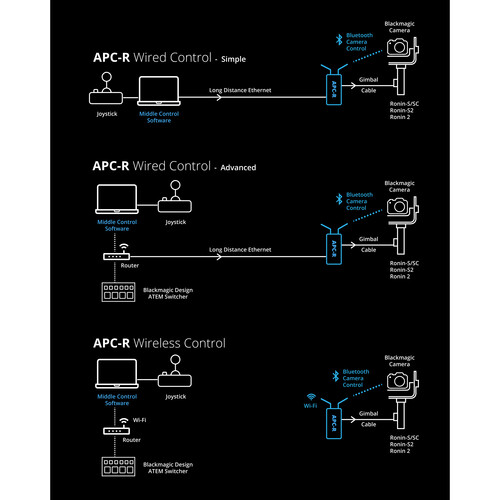
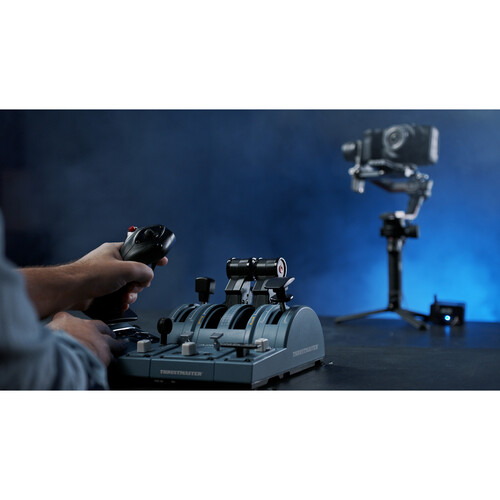
Turn your compatible DJI gimbal into a PTZ system with the Middle Things APC-R Controller, and take advantage of the smooth motor movements and sharp optics of your camera to create images without the need for a PTZ camera system. Each APC-R can control a gimbal/camera setup, and you can control up to eight settings from a single laptop with a single USB controller. Combine the DJI gimbal with a compatible Blackmagic Design camera, and you get the equivalent of a high-end PTZ camera system.Using Middle Control software, you can map joystick controls and actions to your gimbal to make it work as if it were a dedicated PTZ head. The software also enables control of shutter, iris, WB, gain and focus when using selected Blackmagic Design cameras. Adding a Blackmagic ATEM switch to the mix gives you control over even more advanced camera features such as luma, gamma, lift, contrast, saturation and sharpness.
Easy to set up
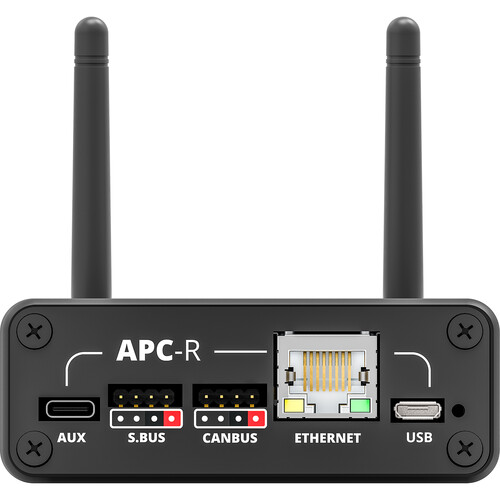
- Run a single cable between the APC-R and your gimbal for communication and power.
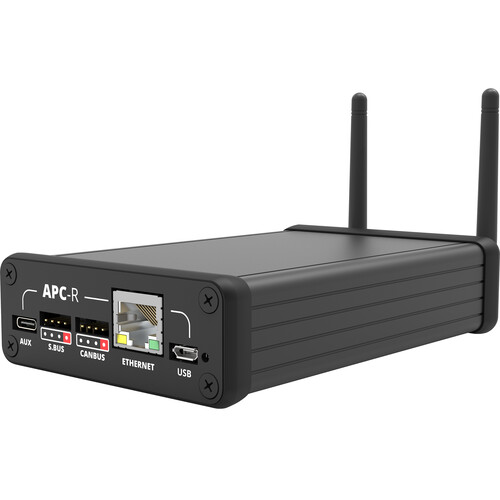
- For additional reliability, use a wired Ethernet connection from the APC-R to your computer or network router.
- The connection from the APC-R to the camera is via Bluetooth.
Remote Control for Camera
- Use compatible Blackmagic Design cameras on your gimbal to remotely control shutter/aperture/white balance/gain/focus via Bluetooth in addition to the pan, tilt, roll, speed or zoom motor on the gimbal.
- When using an ATEM gear, you can connect the Middle Control computer software to the ATEM to control more advanced camera settings such as luma, gamma, lift, contrast, saturation and sharpness.
Saving Preset Positions
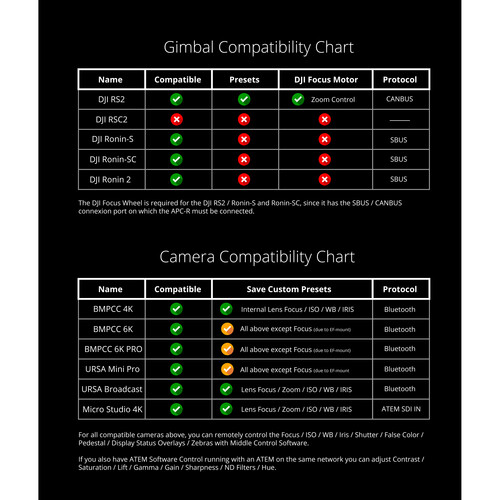
When using APC-R with DJI RS2, you can save customized camera position presets and recall them later. Store a custom white balance/ISO/aperture/shutter/tone preset in addition to the pan/tilt/roll/zoom status of the gimbal when using a compatible Blackmagic Design camera and ATEM switch. If you use an MFT lens with electronic communication, you can also save the lens focus distance.Wireless
- In addition to the built-in Ethernet port offering a wired control solution, you can use the built-in Wi-Fi receiver to control the gimbal and camera completely wirelessly. When the Ethernet cable is disconnected, the APC-R will automatically switch to Wi-Fi within seconds.
- When connected to an ATEM switch via Wi-Fi, the APC-R grabs all ATEM Software Control camera controls and relays them to the Blackmagic camera using Bluetooth. Pair it with a video transmission system and you have a completely wireless remote camera setup.
Two Included Software Apps
- The Middle Setup iOS app lets you easily adjust your APC-R settings via Bluetooth camera pairing for Wi-Fi and network settings, camera numbers, and more.
- The Middle Control desktop app allows you to remotely control all your cameras and gimbals from a laptop in your control room. You can connect up to four USB joystick controls and map camera and gimbal settings to any joystick button or axis.
Compatible gimbals
- DJI Ronin RS2
- DJI Ronin-S
- DJI Ronin-SC
- DJI Ronin-2
Please note that an optional DJI R Focus Wheel is required for use with the Ronin-S, SC and RS2 as the APC-R connects to the focus wheel's data port. Additionally, the DJI Ronin RS2 is the only gimbal that supports Position Presets and DJI Focus Motor Control.
Compatible cameras
- Blackmagic Pocket Cinema Camera 6K
- Blackmagic Pocket Cinema Camera 6K Pro
- Blackmagic Ursa Broadcast
- Blackmagic Ursa Mini Pro
- Blackmagic Ursa Mini Pro G2
- Blackmagic Pocket Cinema Camera 4K
- Blackmagic Studio Camera 4K Pro
- Blackmagic Studio Camera 4K Plus
- Blackmagic Micro Studio 4K (needs its SDI IN connected to an ATEM PGM output and ATEM connected to Middle Control)
Compatible ATEM changers
- ATEM Mini/Mini Pro/Mini Pro ISO
- ATEM Mini Extreme/Extreme ISO
- ATEM TV Studio HD
- ATEM Television Studio Pro HD
- ATEM Television Studio Pro 4K
- ATEM Production Studio 4K
- ATEM 1M/E & 2M/E Production Studio 4K
- ATEM 4M/E Broadcast Studio 4K
- ATEM Constellation 8K