
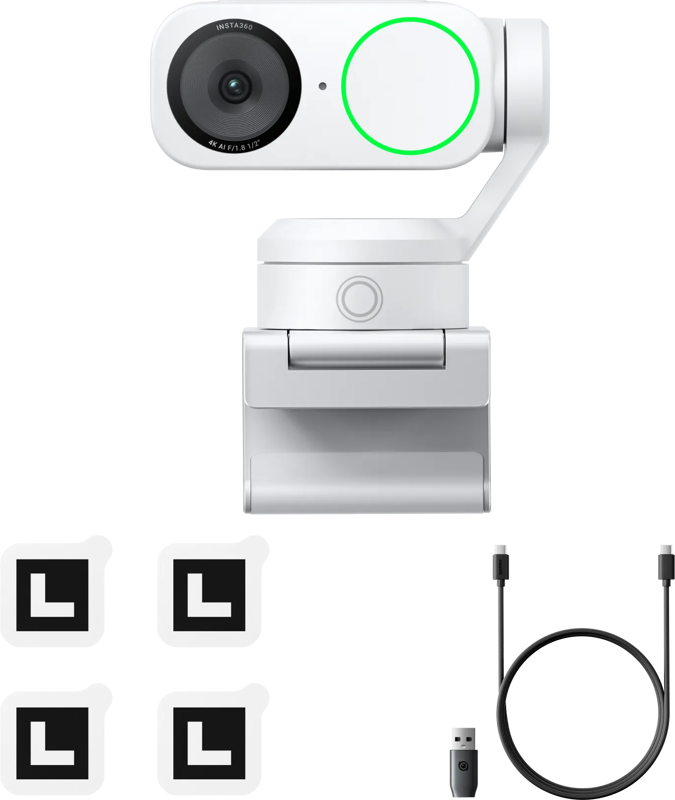
Insta360 Link 2 Standard Edition - Arctic White
- VAT free purchase available at checkout.
- BrandInsta400
Description
Article no.: 31668
Insta360 Link 2 Standard Edition – 4K gimbal webcam with AI tracking (Arctic White)
The Insta360 Link 2 Standard Edition in Arctic White is a gimbal webcam designed for calls, presentations, and live streams. It combines a 1/2" CMOS sensor with 4K/30 video and a 2-axis pan/tilt gimbal to keep framing steady. On-device AI tracking and gesture controls help you stay centered during movement, while HDR balances highlights and shadows in mixed lighting.
Core camera features
- 4K video and framerate options: Capture up to 4K at 30 fps. You can also select 1080p or 720p at up to 60 fps for smoother motion or lower bandwidth use.
- Sensor and autofocus: A 1/2" CMOS sensor pairs with phase-detection autofocus for quick focusing on faces, documents, or objects held to the lens.
- Field of view and zoom: The lens offers a 79.5° diagonal field of view (about 67° horizontal) and a 4× digital zoom for tighter framing without changing physical position.
- HDR support: HDR helps balance highlights and shadows when lighting varies across the scene.
Gimbal, AI and shooting modes
The camera uses a 2-axis pan/tilt gimbal to produce stable framing and smooth motion when you move. On-device AI tracking keeps the subject centered. You can trigger tracking with gesture start/stop controls and choose from multiple framing modes depending on the task.
- DeskView: Tilt the camera down to show your workspace for sketching or demonstrations.
- Whiteboard: The camera detects board corners and crops to the board for teaching, walkthroughs, or presentations.
- Overhead: Use for top-down demonstrations and document displays.
- Portrait (9:16): Rotate the camera 90° to produce vertical output for social or mobile-first formats.
- Privacy tilt: The lens can automatically tilt down when idle and can also be manually tilted down at any time for privacy.
Audio and background handling
Insta360 Link 2 applies AI noise reduction and gives you selectable audio modes to match the environment. You can also control how the background appears using the companion app.
- Audio modes: Voice Focus for solo calls, Voice Suppression for busy rooms, and Music Balance when background audio is part of the scene.
- Background handling: Choose between natural bokeh, full blur, or background replacement in the control app to suit your presentation style.
Connectivity, power and control
- Connection: USB-C 2.0 connection to your computer.
- Power: The camera is bus-powered via USB-C.
- Control software: A desktop controller app is available for macOS and Windows, and a mobile app is available for Android and iOS for additional adjustments.
Typical setups and use cases
The Link 2 adapts to several common workflows. Here are typical setups and recommended settings based on the original guidance.
- Solo desk: Enable AI tracking for stand-up or seated presenting and use Voice Focus in quiet rooms to prioritize speech clarity.
- Teaching and training: Mark the board corners and switch to Whiteboard mode; use DeskView for sketching and top-down demos to clearly show materials.
- Product demos and content creation: Set a close-focus preset, switch to 9:16 for vertical content when needed, and adjust exposure, color temperature, and gimbal speed in the app for consistent results.
What’s included and compatibility
- In the box:
- 1x Insta360 Link 2
- 1x Magnetic Mount
- 4x Recognition Markers
- 1x USB-C Cable
- 1x USB-C to USB-A Adapter
- (Tripods and stands are optional and not included.)
- Software compatibility: Works with common conferencing and streaming software on Windows 10+ and macOS 10.13+.
- Audio options: Use the built-in audio processing or pair an external microphone through your computer or audio interface.
Physical and operating details
The camera offers flexible mounting and operates in typical indoor conditions. It connects via a magnetic clip that supports 1/4-20 mounting for use with many tripods and stands.
| Specification | Details |
|---|---|
| Sensor | 1/2" CMOS |
| Video capture | Up to 4K at 30 fps; 1080p/720p up to 60 fps |
| Autofocus | Phase-detection autofocus |
| Field of view | 79.5° diagonal (about 67° horizontal) |
| Zoom | 4× digital zoom |
| Gimbal | 2-axis pan/tilt with AI tracking and gesture control |
| Connection | USB-C 2.0 (bus-powered) |
| Mounting | Magnetic clip with 1/4-20 mounting |
| Operating temperature | 0–40 °C |
| Dimensions | Approx. 71.3 × 58.9 × 38.0 mm |
| Weight | Approx. 102 g (camera only); about 167 g with mount |
| Software | Controller app for macOS and Windows; mobile app for Android and iOS |
FAQ
Question: Can I use the Link 2 without additional power, and how does it connect?
Answer: Yes. The camera is bus-powered over USB-C 2.0 and connects to your computer via USB-C for both power and data.
Question: Does the camera keep me centered if I move around the room?
Answer: Yes. On-device AI tracking with a 2-axis gimbal pans and tilts to keep the subject centered, and you can start or stop tracking with gesture controls.
Question: Which modes help with teaching or showing documents?
Answer: Use Whiteboard mode to detect and crop to marked board corners, and DeskView to tilt the camera down for top-down demonstrations and sketching.
Question: What audio processing options are available for different environments?
Answer: The camera provides AI noise reduction with selectable modes: Voice Focus for quiet rooms, Voice Suppression for busy rooms, and Music Balance when you want to preserve background audio.
Question: Will this work with my conferencing software and Mac/PC?
Answer: Yes. Link 2 works with common conferencing and streaming software on Windows 10+ and macOS 10.13+. For audio, you can use built-in processing or route an external microphone through your computer or interface.
Question: What accessories come in the box, and are tripods included?
Answer: The box includes the Insta360 Link 2, a magnetic mount, four recognition markers, a USB-C cable, and a USB-C to USB-A adapter. Tripods and stands are optional and not included.